

 ChatGPT
 Perplexity
 Gemini
 Claude
 Grok
Grok
Google 最新 AI 圖像編輯工具Nano Banana(整合至 Gemini 2.5 Flash Image)自推出僅一週內就為 Gemini 應用程式帶來超過 1,000 萬名新使用者,並達成超過 2 億次圖像編輯。這項工具在科技業界和社群媒體上迅速引發熱烈討論。
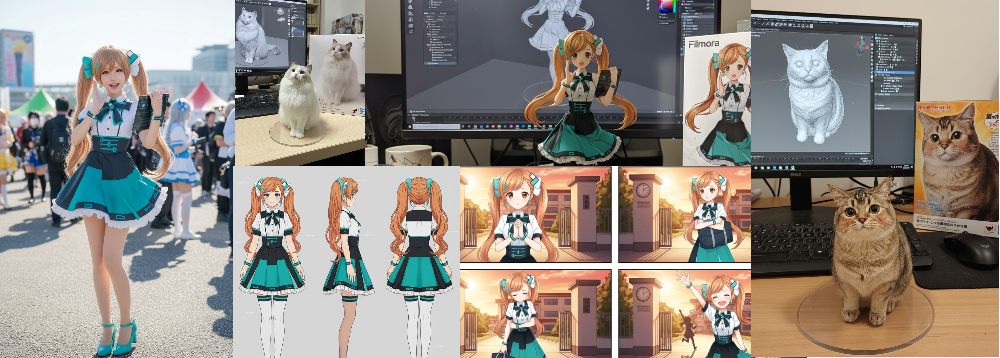
此工具成功避免了「恐怖谷」現象,即使經過多次編輯,也能維持人物的面部特徵與輪廓。此外,使用者只需透過自然語言指令,就能輕鬆完成換裝、背景更換、多張圖片合成等進階編輯。免費方案每日可編輯 100 次,Premium 方案最多可達 1,000 次,最快數秒內就能得到結果。


目錄
1. 【nano-banana(Gemini 2.5 Flash Image)】是什麼|特色與應用領域
Nano banana 是一個擅長角色一致性や多圖自然融合的 Prompt 式圖像生成與編輯模型。
在社群媒體和專業領域中,常應用於產品 Mockup、故事漫畫、公仔化等「快速試做且易於量產」的工作流程。在商業應用上,透過模板化 Prompt+自然語言編輯+批次處理能夠在短時間內穩定重現實用品質的特性,獲得高度評價。
nano-banana 的主要特色(重點)
- 高一致性人物表現:保持面部輪廓與氛圍同時避免「恐怖谷」,多階段編輯也不易崩壞。
- 自然語言進階編輯:服裝變更、背景替換、多圖融合都能透過文字指令完成。
- 速度:最快數秒即可產出結果的輕快體驗。
商業使用的可行性與限制請務必確認各工具的使用條款。
2. Filmora「圖片轉影片(Image to Video)」的 AI 整合應用提案
將 Nano-banana 生成的連續圖片或單張圖片透過 Filmora 的圖片轉影片功能動畫化。鏡頭運動、粒子效果、光影演出、字幕與背景音樂一站式完成。
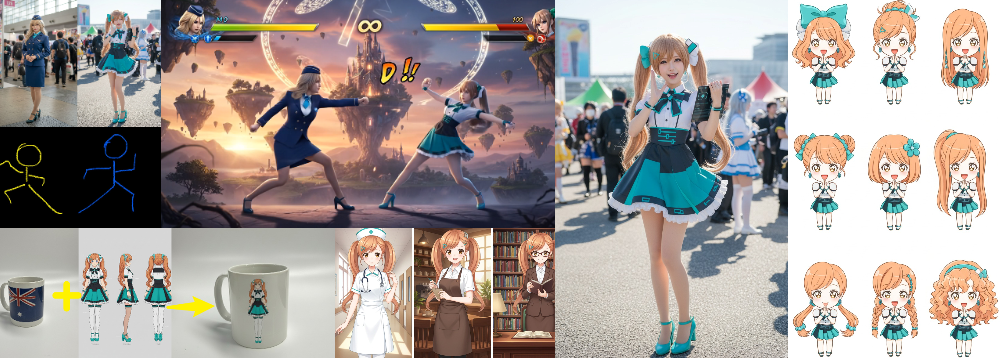
火柴人動畫化圖片 Prompt 範例【Nanobanana】:Replace the characters from photo 1 and photo 2 with the fighting game-style pose from photo 3, keeping the facial structure, hairstyle, hair color, skin tone, and body proportions exactly the same as in photo 1. Set the background in a game-style fantasy world with floating islands, a glowing castle in the distance, and magical circles or drifting light particles in the sky. Use a combination of warm sunset lighting and cool fill light to enhance depth. Shoot with a 35 mm equivalent, f/2.8, shallow depth of field, positioning the characters near the center of a rule-of-thirds composition. Render the entire scene in high detail, with realistic textures in clothing and hair.
格鬥遊戲風影片生成 Prompt 範例【Filmora】:The two characters in the image are engaged in an intense battle scene, keeping their designs, outfits, and features consistent. Depict the fight in a high-quality, game-style aesthetic, with dynamic, exaggerated poses full of tension. The background should resemble a fantasy game stage, featuring floating magical symbols, energy waves, particle light effects, sparks, and shockwaves as combat effects, along with optional UI elements such as health bars or skill effect frames to enhance the gaming atmosphere. Convey the impact and speed of the fight with motion blur, light streaks, and subtle air distortion. Lighting should combine a strong key light with ambient light for depth and dimensionality, and the composition should focus on the clash between the two characters. Include onomatopoeic combat sound effects in the scene (e.g., "BANG!", "CLASH!", "WHOOSH!") to add excitement and immersion.
Filmora 圖片轉影片基本模式的使用區分
- 影片靈感:
內建豐富的 AI 模板。無需輸入 Prompt,只需點擊即可生成高精度影片。 - 圖片轉影片:
搭載 VEO3 模式與標準模式。輸入 Prompt,按照指示從圖片創作吸引人的影片。 - 開始/結束幀生成影片:
從開始圖片到結束圖片平滑補間,加入自然的轉場效果。 - 參考內容生成影片:
上傳 2~3 張參考圖片,根據元素間的變化或關係自動生成影片。 - 影片元素編輯:
可在影片中新增或替換指定元素。
Filmora「圖片轉影片」各模式與 Nano Banana 整合的工作流程,在Part4中有詳細解說,歡迎一併參考。
3. 場景別 Prompt 應用集 — Nanobanana 可用範例
這裡整理了nanobanana 可應用的場景別 Prompt 範例。
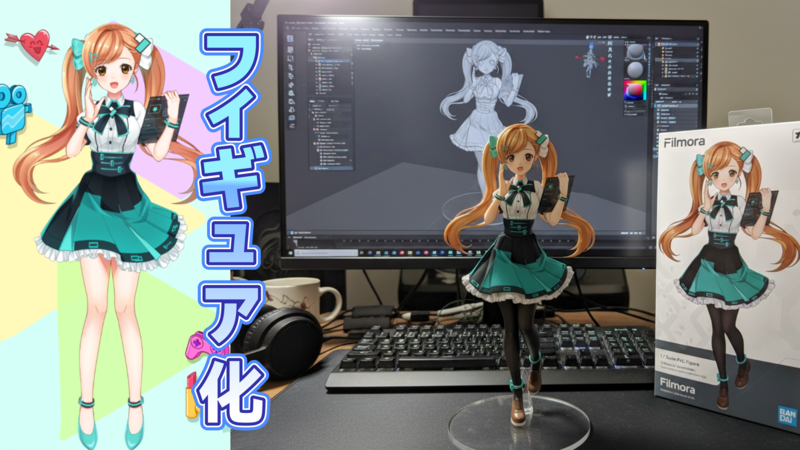
3-1.【公仔化】
- 適用場景:產品照風格的立體表現/評測用的旋轉展示
- 訣竅:明確指定底座材質、背景位置、光線
Prompt 範例(真實環境): Use the nano-banana model to create a 1/7 scale commercialized fiqure of the characterin the illustration,in a realistic style and environment. Place the figure on a computerdesk, using a circular transparent acrylic base without any text. On the computer screen,display the ZBrush modeling process of the figure. Next to the computer screen, place a BANDAl-style toy packaging box printed with the original artwork.
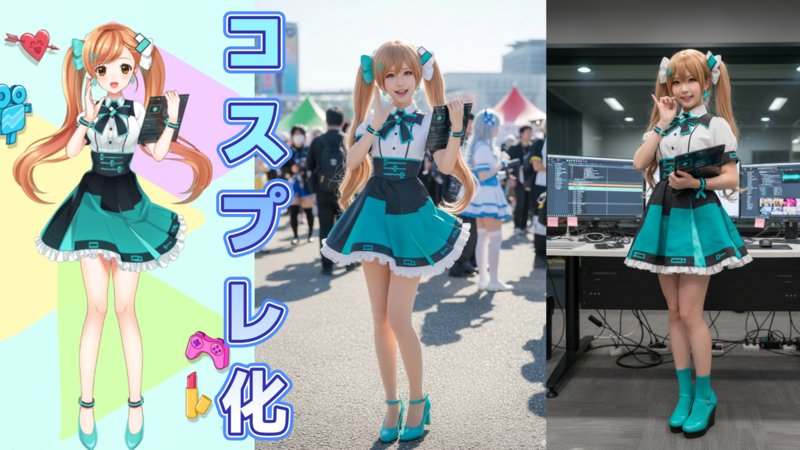
3-2.【Comic Market Cosplay 化】
- 適用場景:插圖→實拍風格的 Cosplay 照片化
- 訣竅:指定地點(Cosplay 廣場)、時段、實拍質感
Comic Market Cosplay 化 Prompt 範例:Create a highly realistic cosplay photo of a cute Japanese female cosplayer, dressed as the character in the reference illustration. The photo is taken outdoors at Comic Market (Comiket), in the cosplay plaza area. Please capture the scene with a natural photographic look, realistic lighting, skin texture, and detail. The framing, angle, and perspective should match the reference illustration as closely as possible, as if it were an actual photo taken at the event.
3-3.【火柴人、草圖姿勢生成角色】
- 適用場景:粗略人形或草圖→遊戲風格動作圖/短片素材
- 訣竅:固定臉部、髮型、體格描述+固定背景世界觀
火柴人圖片 Prompt 範例【Nano Banana】:Replace the characters from photo 1 and photo 2 with the fighting game-style pose from photo 3, keeping the facial structure, hairstyle, hair color, skin tone, and body proportions exactly the same as in photo 1. Set the background in a game-style fantasy world with floating islands, a glowing castle in the distance, and magical circles or drifting light particles in the sky. Use a combination of warm sunset lighting and cool fill light to enhance depth. Shoot with a 35 mm equivalent, f/2.8, shallow depth of field, positioning the characters near the center of a rule-of-thirds composition. Render the entire scene in high detail, with realistic textures in clothing and hair.
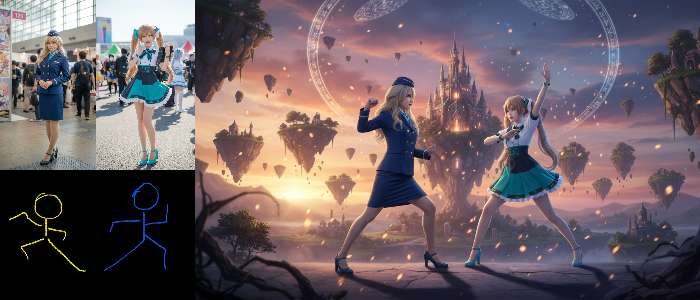
此外,使用 Filmora 的「圖片轉影片」VEO3 模式即可將這裡製作的素材順暢轉換為附音效的格鬥遊戲風格影片。
格鬥遊戲風影片生成 Prompt 範例【Filmora】:The two characters in the image are engaged in an intense battle scene, keeping their designs, outfits, and features consistent. Depict the fight in a high-quality, game-style aesthetic, with dynamic, exaggerated poses full of tension. The background should resemble a fantasy game stage, featuring floating magical symbols, energy waves, particle light effects, sparks, and shockwaves as combat effects, along with optional UI elements such as health bars or skill effect frames to enhance the gaming atmosphere. Convey the impact and speed of the fight with motion blur, light streaks, and subtle air distortion. Lighting should combine a strong key light with ambient light for depth and dimensionality, and the composition should focus on the clash between the two characters. Include onomatopoeic combat sound effects in the scene (e.g., "BANG!", "CLASH!", "WHOOSH!") to add excitement and immersion.
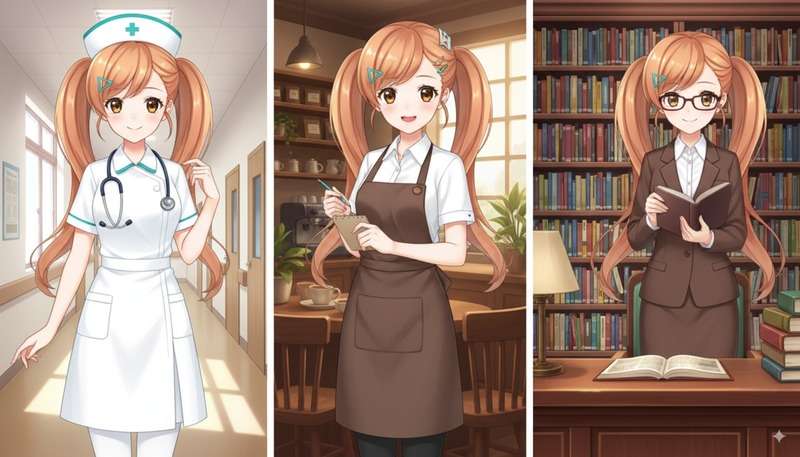
3-4.【角色一致生成】
- 適用場景:同一角色的職業別服裝或季節服裝量產
- 訣竅:每次明確固定臉型、髮型、髮色、體格、膚色的描述
角色一致 Prompt 範例【Nano Banana】:Generate the following three outfit styles while keeping the character's face and hairstyle consistent with the reference illustration (same facial shape and features, hairstyle must be kept exactly, and hair color, skin tone, and body proportions should match)on one picture.Nurse: clean white uniform with stethoscope, bright hospital corridor. Barista: brown apron, notepad, warm café interior. Librarian: brown suit, glasses, desk surrounded by shelves.
3-5.【四格漫畫】
- 適用場景:短篇故事量產/社群媒體發布
- 訣竅:固定背景,簡潔描述各格的情緒與小物
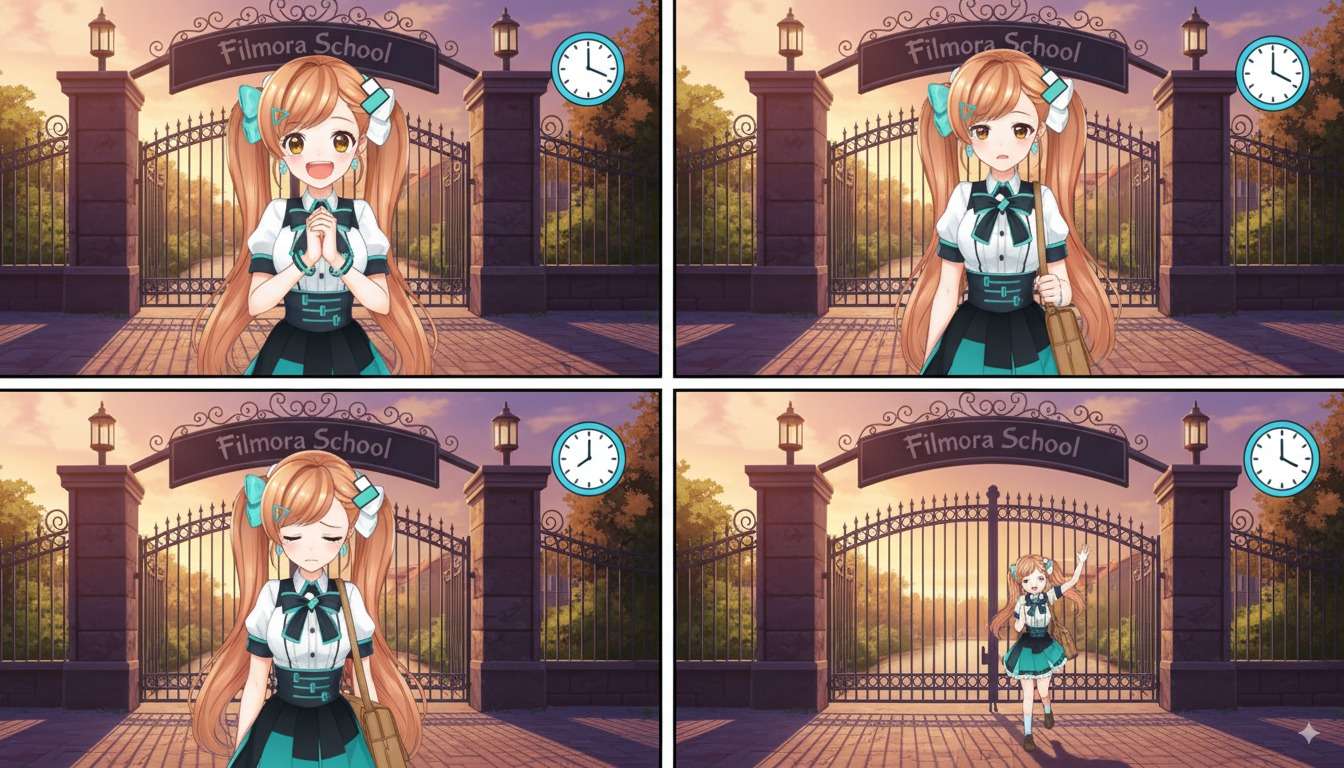
四格漫畫 Prompt 範例【Nano Banana】:Create a 4-panel comic featuring this character, keeping the background consistently in front of the school gate with a visible sign reading Filmora School.Panel 1 – Anticipation: eyes sparkling with excitement, hands clasped in front of chest, clock showing 3:00.Panel 2 – Waiting: slightly anxious expression while looking at the clock, holding a bag while standing, clock showing 3:30.Panel 3 – Disappointment: slumped posture with a sigh, shoulders dropped, sunset light beginning to cast.Panel 4 – Relief: smiling with a sense of relief, waving hands
3-6.【貼圖製作】
- 適用場景:LINE 等貼圖素材批次生成
- 訣竅:輪廓清晰+白色/透明背景,明確呈現情緒變化
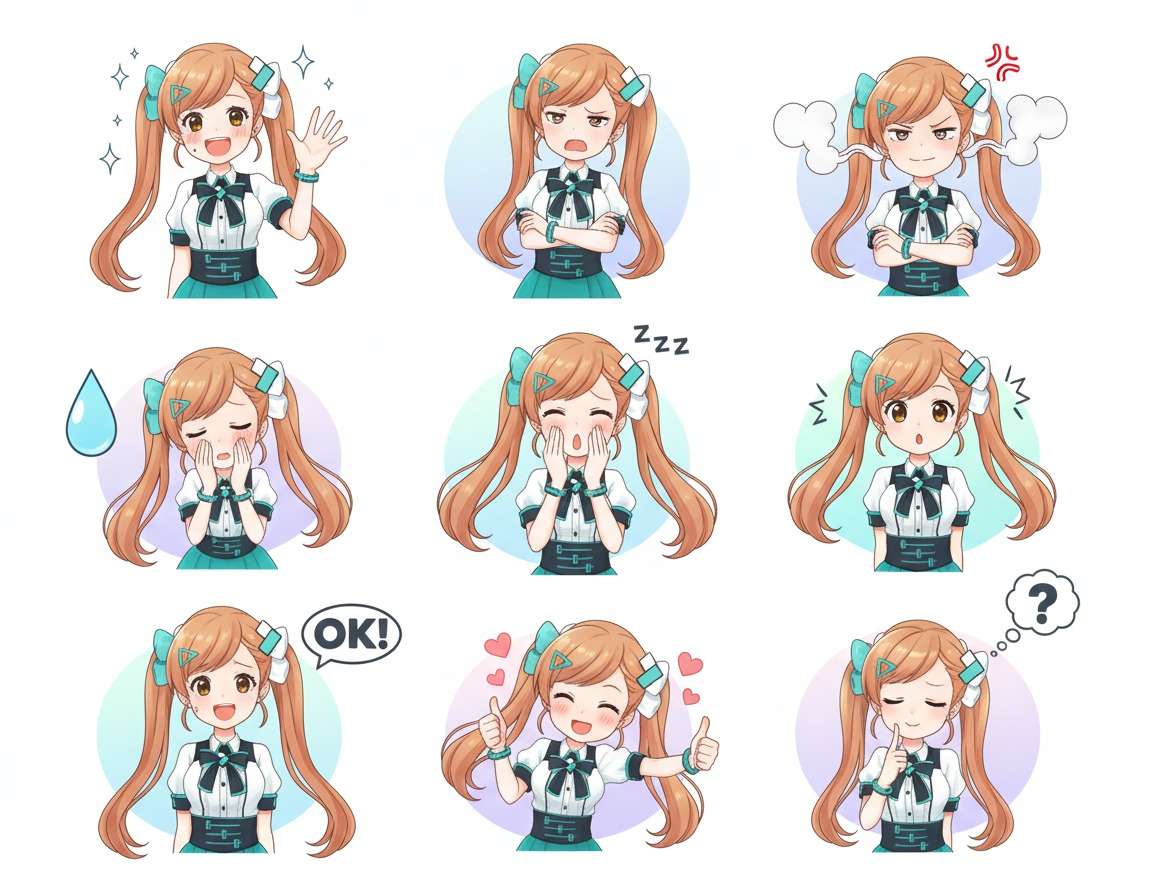
貼圖製作 Prompt 範例:Generate an image of stickers.Using the reference image, create 9 different poses and facial expressions suitable for use as LINE stickers. Keep the character design, colors, and style consistent with the reference. Each pose and expression should clearly convey a different emotion or action, with clean outlines, simple backgrounds (white or transparent), and high resolution suitable for sticker use.
3-7.【三視圖製作】
- 適用場景:3D 化/模型共享用的基準圖像
- 訣竅:指定 A-pose+正面、背面、側面,陰影與背景保持簡潔
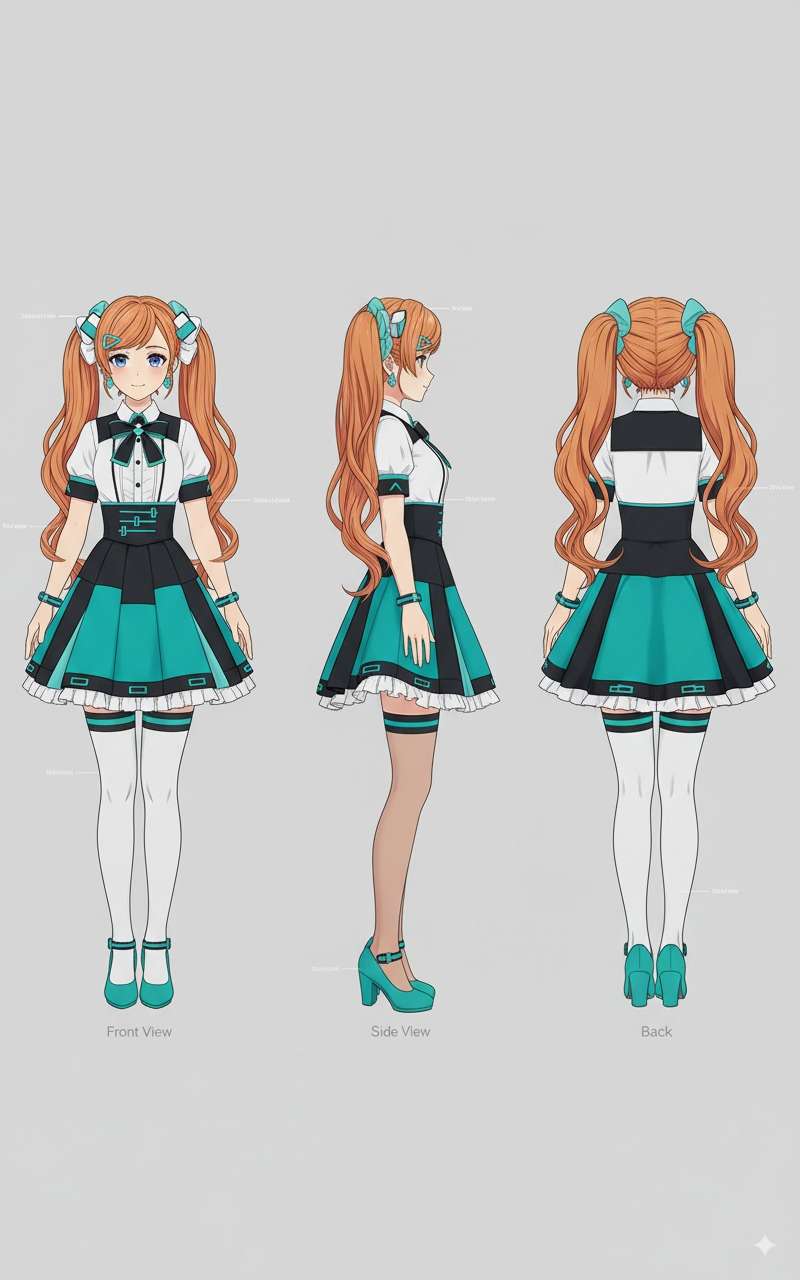
三視圖製作 Prompt 範例:Character model sheet of this girl in an A-pose, showing front, side, and back views.
3-8.【Mockup 製作】
- 適用場景:周邊試作/電商刊登的形象製作
- 訣竅:處理曲面透視與反射、陰影的整合性
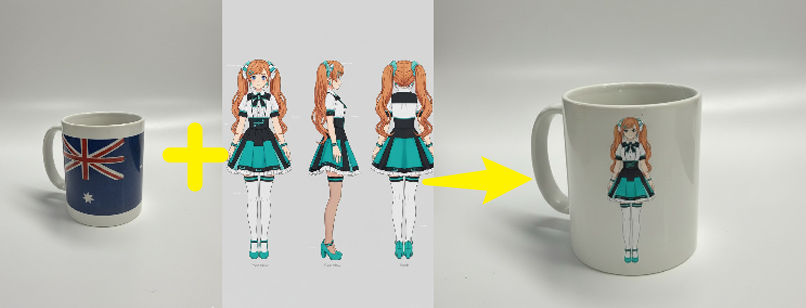
Mockup 製作 Prompt 範例:Replace the existing design on the water cup with the anime character illustration from image, keeping the character's proportions and composition harmonious while naturally conforming to the cup's curvature and perspective. Adjust lighting and reflections so the character graphic blends seamlessly with the cup, producing a high-quality product mockup. Use a clean, minimal background and environment to emphasize the cup and printed design, with subtle scene lighting to enhance texture and realism.
3-9.【線稿上色】
- 適用場景:線稿→彩色量產、服裝差分製作
- 訣竅:固定臉部、髮型、體格+指定配色一致性
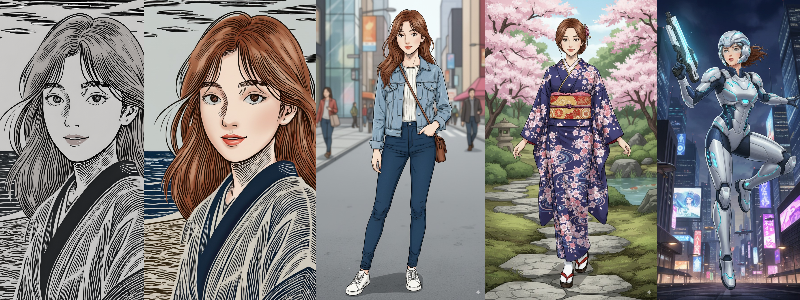
線稿上色 Prompt 範例:Colorize the provided line art with high quality, keeping the character's facial features, hairstyle, and proportions unchanged. Colors should be natural and harmonious while preserving the line details.Based on this, create multiple alternative outfit styles (e.g., modern casual, traditional kimono, sci-fi armor, fantasy attire) and design various action poses (e.g., standing, walking, jumping, fighting).All versions must maintain character consistency, with lighting, perspective, and scene elements matching naturally, and output in high resolution, suitable for commercial use.
3-10.【髮型轉換】
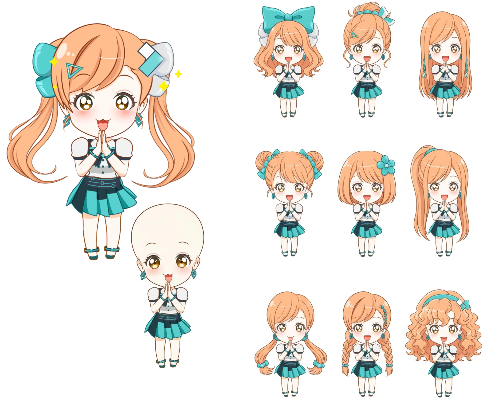
- 適用場景:同一角色僅改變髮型的差分生成
- 訣竅:髮型/髮飾以外的元素固定。
髮型轉換 Prompt 範例:Based on the character in the reference image, generate a set of 9 new cute hairstyles. Only change the hairstyle; keep all other elements exactly the same (facial features, expression, outfit, pose, background, lighting, proportions, etc.). Each new hairstyle should fit naturally to the character's head shape and hairline, matching the perspective, orientation, and lighting, and be rendered in high resolution with fine details.
4. Nanobanana 與 Filmora 整合的 AI 影片編輯工作流程
- 模板快速製作(影片靈感):
透過內建 AI 模板,僅需點擊操作就能加上「吸睛」的動態效果。
應用範例:將生成的 AI Cosplayer(例:Comic Market 空間的空服員)套用至「火影忍者舞蹈風格」等舞蹈模板,製作與音樂同步的短片。工作流程:① 用 nanobanana 生成角色圖片 → ② Filmora 選擇模板 → ③ 微調長度、字幕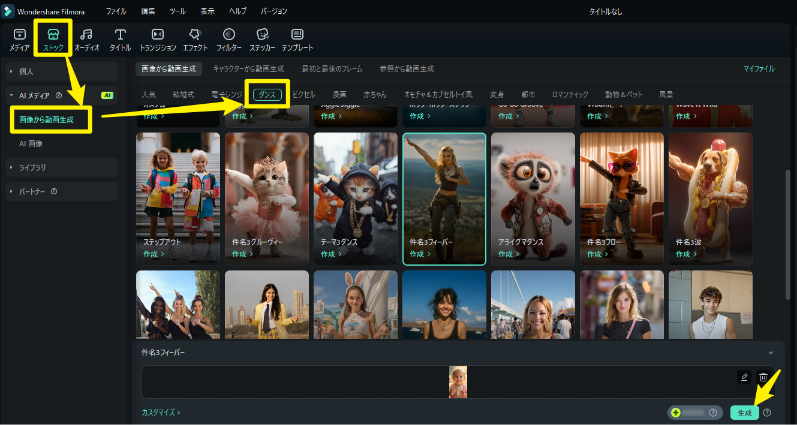
AI 模板|Filmora(手機與電腦均適用)
- 圖片轉影片(VEO3/標準):
從 1~數張圖片加入鏡頭運動或自然動態。VEO3 模式可實現高品質。
應用範例:四格漫畫按時間順序動態化/格鬥場景加入動態特效。工作流程:① 準備 4 張(或連續)圖片 → ② Filmora「圖片轉影片」(建議 VEO3)→ ③ 以 1.2–1.5 秒/格進行編輯Prompt 範例(格鬥・nanobanana):
「同一角色 2 名對峙的遊戲風格戰鬥。浮空島與發光城堡的奇幻背景、魔法陣與粒子、火花與衝擊波。動作加上動態模糊」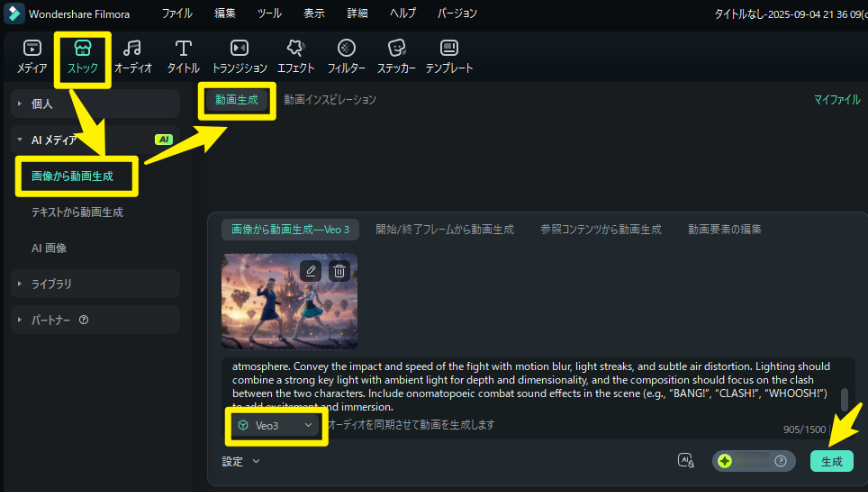
AI 模板|Filmora(手機與電腦均適用)
- 開始/結束幀生成影片(補間):
在開始圖片→結束圖片之間平滑補間,呈現「變化」效果。
應用範例:髮型轉換(例:雙馬尾→放下頭髮)/服裝轉換(春季制服→冬季制服)。Filmora 指示範例:
「6–8 秒補間,中段 0.5 秒靜止。花瓣→雪的粒子切換,色溫逐漸轉為冷色調」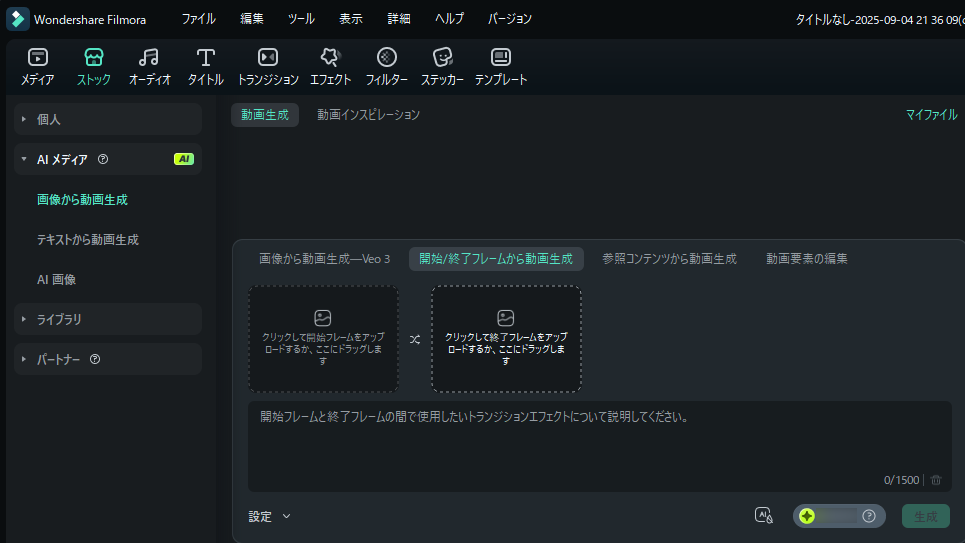
開始/結束幀生成影片|Filmora(手機與電腦均適用)
- 參考內容生成影片(元素關係自動理解):
上傳 2~3 張參考圖片,根據元素間關係自動生成拼貼式動態。
應用範例:生成的人物+產品 Mockup(杯子)→「人物用杯子喝水」的影片。工作流程:① 準備人物圖片+Mockup 圖片 → ② Filmora「參考內容」模式 → ③ 微調手部、嘴部接觸時機Filmora 指示範例:
「2 參考:人物+杯子。3–5 秒,微跟拍手部。飲用瞬間停留 0.3 秒,輕加蒸氣與水面反射」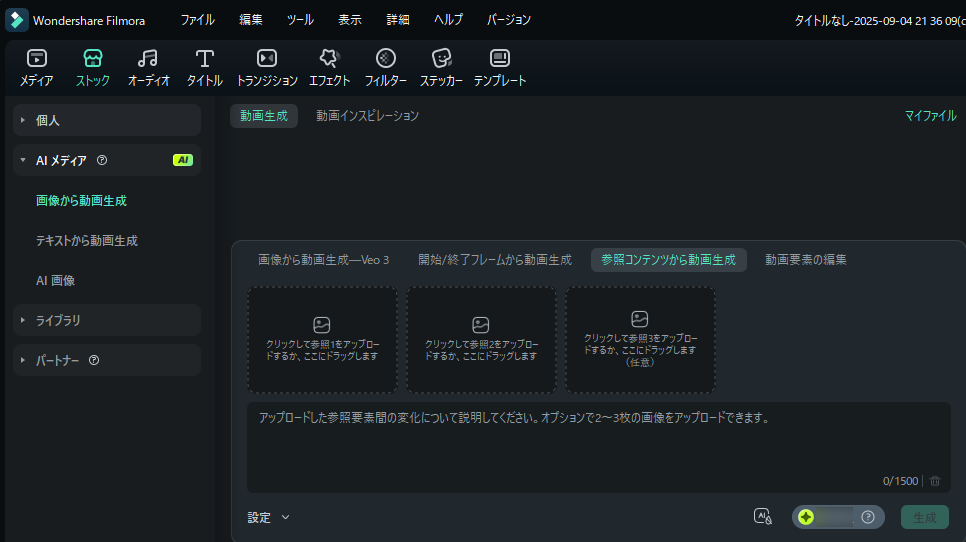
參考內容生成影片(元素關係自動理解)|Filmora(手機與電腦均適用) - 影片元素編輯(合成、替換):
在編輯或已拍攝影片中,合成生成圖片(例:產品 Mockup、「Filmora School」招牌)。
應用範例:在校門前的實拍影片中自然合成「Filmora School」招牌/在既有廣告中替換新包裝圖片。工作流程:① 準備影片+圖片素材 → ② Filmora「影片元素編輯」模式 → ③ 微調Filmora 指示範例:
「2 參考:人物+杯子。3–5 秒,微跟拍手部。飲用瞬間停留 0.3 秒,輕加蒸氣與水面反射」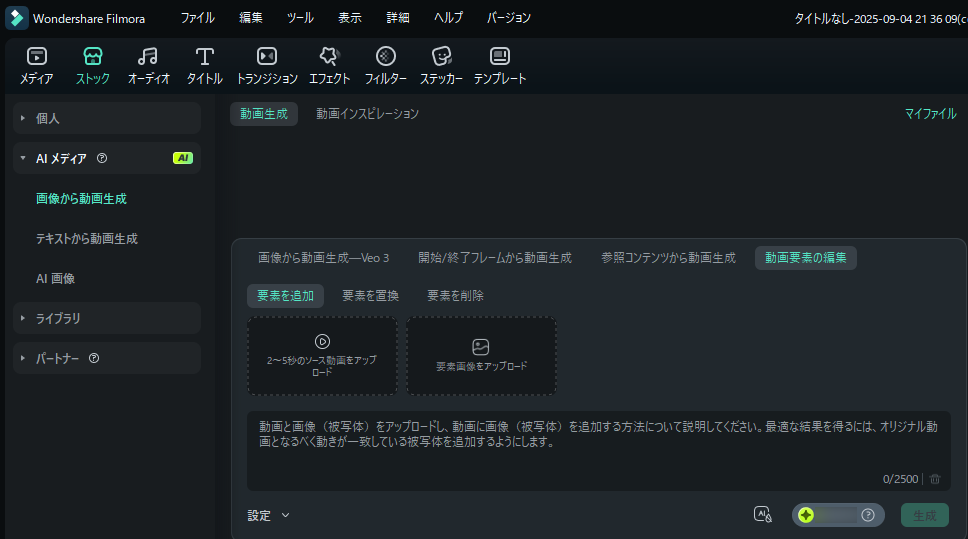
影片元素編輯(合成、替換)|Filmora(手機與電腦均適用)
5. 最佳實踐|品質、效率、發布的實用技巧
- 故事性描述透過情境、情感、光線來描繪(避免單純羅列關鍵字)。
- 統一構圖、光源、視角:大幅提升影片生成的自然度。
- 同步標註英文提示詞:有利於細節控制。
- 版權考量:注意第三方著作物、真實 Logo 的使用。
- 輸出一致性:同一角色需維持相同服裝、髮色、表情風格。
FAQ|常見問題
Q. 可以商用嗎?
請確認各服務的使用條款與授權規範。請注意素材中不得包含第三方權利(人物、Logo、作品等)。
Q. 一致性總是不理想…
在提示詞中明確標註「相同角色」「相同姿勢」「相同光源方向」,並加入固定色彩、服裝、表情的描述。